Google Ad sense


All source codes in this blog are also available in Gregory Choi's Github Source code Repository


Showing posts with label Mining. Show all posts

Tuesday, April 12, 2016

[Machine Learning] Naive Bayes in R (1)

[Previous Posts]
Introduction to Machine Learning
K-nearest Neighbor Analysis (1)
Classification Tree (CART) (1)

[About Bayes Theorem]

Let's assume that there is a basket that has 10 marbles.
We know it has blue marbles or orange marbles for sure, but we don't know how many of them are blue or orange.


You are asked to guess the color of the marble when you pick up the marble from the basket.
Your best guess is either choose blue or orange by flipping coin. As you might know it's not scientific, but this is the best way to guess.

Here is the different situation. Now, you know that there are 9 blue marbles and only 1 orange marble.


In this case, no one would dare to guess that the marble has orange color. We all know the Bayes theorem intuitively. Prof. Woonkyung Kim in Korea university called it as "the evolution of the probability"

Let's mathematically organize the situation. When we don't have the information, the probability of picking up a blue marble is

P(Blue) = 0.5. Just same as flipping coin and it turns out to be head or toss.

However, if we have the information,

P(Blue | Information) = 0.9.

Bayes theorem is in your smartphone also. (By the way, your cell phone is a collection of the probability theorems) The digital converts all the information into either 1 or 0. (Encoding the information). And prepared to send the digital signal. One way to make a difference between 1 or 0 in the signal is to manipulate the power of signal. We can give 0 less power and 1 more power. The power diagram is like below.


However, as soon as this signal goes through the air, this signal meets white noise, which could be generated by your conversation, light, or interruption of other electro-magnetic wave. When this signal gets to your cell phone, it ends up with the probability distribution like below.


When we get the signal if it has a blue line power, we naturally assume that that signal means 0. When we get the signal if it has a red line power, we naturally assume that that signal means 1. We are going to apply same theory to allow the machine to learn the data. (By the way, there's slight possibility of the error. Shannon came up with the way to correct this error. He also contributed to the birth of Classification Tree model)

[Validating the distribution function]

Let's figure out that our test data(iris) has the normal distribution. You can use the histogram that you learn in stock market class.
[Review histogram]

We are going to use sepal length and sepal width only.
As this is not our scope (machine learning), I put the code into the different post.
[Getting histograms on sepal length and sepal width (Multiple histograms)]


As you can see, like 0 or 1 case, it has each sub species has a normal distribution in terms of sepal length and width. We can conclude that we can apply Naive bayes to our data set. Please, keep in mind that it cannot be used in a categorical value like Male or Female. Only, CART has a capability of handling categorical values.

[Before Codes]
In this case, you need to install e1071 package.
Install.packages("e1071")

[Codes]
library("e1071")
library("gmodels")

normalize <- function(x) {
    #In this case, like KNN case, it would be better to normalize the data.
    mean_x <- mean(x)
    stdev_x <- sd(x)*sqrt((length(x)-1)/(length(x)))
 
    num <- x - mean_x
    denom <- stdev_x
    return (num/denom)
}

iris <- read.csv(url("http://archive.ics.uci.edu/ml/machine-learning-databases/iris/iris.data"), header = FALSE) #There are great sample data offered by UCI. Let's use this!

names(iris) <- c("Sepal.Length", "Sepal.Width", "Petal.Length", "Petal.Width", "Species")
#Normalize data. Again, it is necessary as we deal with the distribution function.
#If it is not normalized, the distribution function could be distorted.
iris_norm <- as.data.frame(lapply(iris[1:4], normalize))

set.seed(1234)
ind <- sample(2, nrow(iris), replace=TRUE, prob=c(0.7, 0.3))
iris.training <- iris[ind==1, 1:4]
iris.trainingLabels <- iris[ind==1, 5]

iris.test <- iris[ind==2, 1:4]
iris.testLabels <- iris[ind==2, 5]

# Making normal distribution functions.
# For naive bayes, it is more important to choose the right training data set than in other models.
fit<-naiveBayes(iris.training, iris.trainingLabels)

# split up the data into two sets as we did always. 
# Training: Help your computer build the right model
# Test: Validate your data set whether or not it works well.
iris_pred <- predict(fit, iris.test)

#Confusion Matrix => Assessing the machine learning model. I'll explain deeper at another post.
CrossTable(x = iris.testLabels, y = iris_pred, prop.chisq=FALSE)


[Result & Interpretation]

Again, what we need to pay attention to is diagonal direction. So, the accuracy of this model is 36(=10+11+16)/38 = 94.73%. It's not that bad.

Finding a right model is very difficult. It varies from the data to the data. That's why datascientists exist. You have to have good eye to choose the right model to the right data that you have. If you need, you need to formulate the cost-effective data-gathering strategy. That's why the data-scientists get paid a lot in recent years.




Thursday, April 7, 2016

Introduction to Machine Learning / Data Mining

[Machine Learning? Data Mining?]

Well, there is a little bit difference between machine learning and data mining although I don't see any difference between them.

See the debate on the difference between machine learning and data mining.

At the end, it is about training the machine to recognize the data, and the predict the future (or unknown variables) with the training. I'll use both terms interchangeably. Please, feel free to challenge me if I am wrong.

[How it works?]

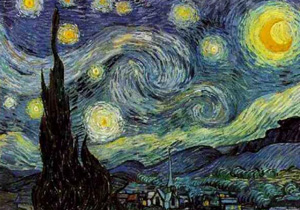
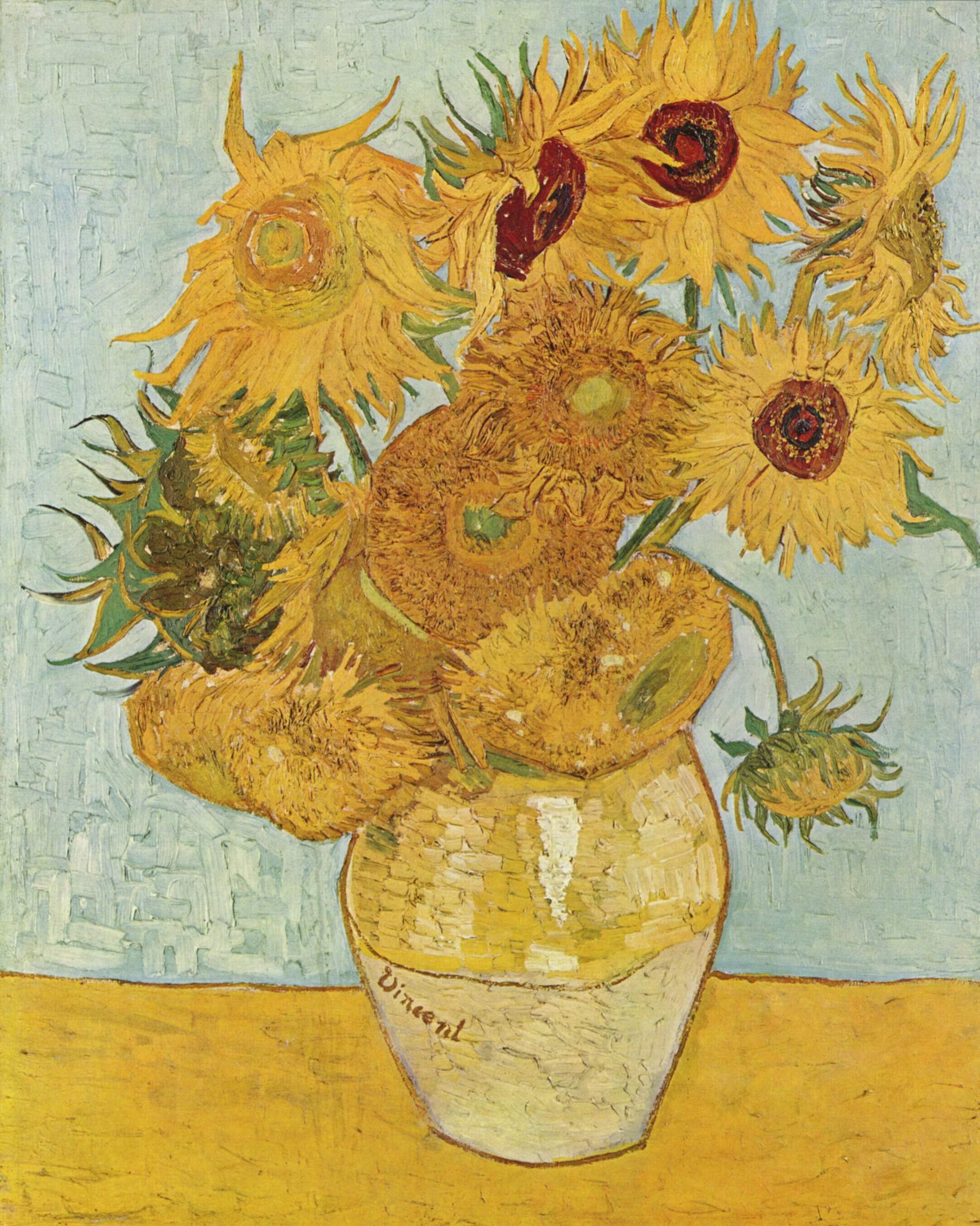
Well, seeing is believing. I have been in search for the better explanation. But, professor Keating in University Notre Dame has a really great explanation for that. You'll see just two pictures with the painters' name. Next, I am going to give you just pictures, and give you the question "who is the painter?" I swear you can answer the question 100% correctly.

<Claude Monet>


<Van Gogh>


Now, who painted these pictures?
<1>


<2>


<3>


<4>


<5>


<Answer>
1 - Gogh
2 - Monet
3 - Monet
4 - Gogh
5 - Gogh

<How your brain worked?>
As soon as you saw those pictures, in your mind, you already have a formula, which allows you to make a difference between two painters. (By the way, both painters are well known to have stark contrast in their painting styles to each other.)

Features Gogh Monet
Color Use 4-5 colors Use more than 10 colors
Style Masculine Feminine
Stroke Rough Smooth
Viewer's Perception Powerful Detailed

Although there are some pictures which exactly doesn't fall into those two categories, we can get a broad sense of which picture is painted by whom.

Machine learning does the same thing. It learns the data given by the user. We call it as a "training set" Then, it applies the formula that was built when the machine analyzed the training set to the data set that we want to forecast. We call it as a "test set." The prediction can be wrong, but generally as we provide the machine with the more qualified test data, we can get the better prediction.

[Where can we apply it?]

<Sales>
You are the sales person of the insurance company. Just you've got the list of potential customers. It has the information of their income, age, place, and jobs. If you are a good sales person, you would have a gut feeling to single out which customer is willing to sign up the new insurance plan. However, with the machine learning, you don't need any gut feeling. If you have the past transaction records, it tells you which customer is the most likely to sign up the new insurance plan.

<Card company>
Suppose that you are in charge of issuing cards. You don't want to issue cards to those who are highly likely not to pay the card bill on time. In this case, you can figure out who is likely to default based upon age, income, job, and savings. Actually, credit card companies adopt this techniques long time ago. If you get "you are rejected to your request on issuing card" message, you would probably not pass this test.

I want to lead this conversation into real application of data mining.


Friday, March 25, 2016

[Machine Learning] K-Nearest Neighbor Analysis in R (1) (Updated)


[Machine Learning / Data Mining post series]


Introduction to Machine Learning
K-nearest Analysis
Classification Tree
Naive Bayes

[About K-nearest Neighbors]

K-nearest model is similar to what we recognize the object intuitively. When we see the fruit which has round shape and red color, we think of it as "an apple." We don't really know that is apple until it goes through DNA test, but we can intuitively recognize the object with certain characteristics of the object. (It could be a fake apple)

K-nearest algorithm is the first machine learning algorithm. But, there are many great resources which explains this algorithm on the internet already. So, in this post, I decided to briefly explain what the underlying algorithm is.

Data Camp shed light on this algorithm from different angle.

It uses "Geographical distance" to classify something. Let's assume that we have two kinds of data point - '+' and '-'. Each one has the characteristic of x and y, which are numbers. Figuratively, let's say we have the data that illustrates characteristics of male and female. x could correspond to height, y could correspond to weight. Although there is a gray area, we can assume that males are generally taller and heavier than females.


As you can see above, we have unknown record "dot." We want to know whether it is "+" or "-" It has two characteristics x and y. By measuring geographical distance, we can predict it is "+," as it is close to the group of "+"s. In this case we use k=3, meaning that it classifies the dot based upon closest three data points. For the sake of simplicity I use k=3 also.

[Training data set vs Test data set]
We are going to split the data set into two. One is "training data set," which allows the computer to learn what the model looks like. Second one is "test data set," which validates our model and measure how our model is well built. There is no golden rule which proportion is the most effective - 30:70, 40:60, or 50:50. However, keep in mind that large training data set doesn't ensure that the our model is more accurate. I use 70:30 in this post. The data set could be sorted in a certain way. In this case, our computer might spit out the biased result. In order to prevent this, I am going to choose the training data set randomly with "sample" command.

[Code]

#K-nearest Analysis algorithm
library("class") #If you don't have it, please install
library("gmodels") #For confusion Matrix

normalize <- function(x) {
  #If we don't normalized it, some distance is far longer than others, which dominates the model.
  mean_x <- mean(x)
  stdev_x <- sd(x)*sqrt((length(x)-1)/(length(x)))

  num <- x - mean_x
  denom <- stdev_x
  return (num/denom)
}

iris <- read.csv(url("http://archive.ics.uci.edu/ml/machine-learning-databases/iris/iris.data"), header = FALSE) #There are great sample data offered by UCI. Let's use this!

#Unfortunately, these data don't have name. We should add the name.
names(iris) <- c("Sepal.Length", "Sepal.Width", "Petal.Length", "Petal.Width", "Species")

#If you want to normalize all data that you have, "lapply" is the greatest way to apply the function to all your data. I want to normalize all my data

iris_norm <- as.data.frame(lapply(iris[1:4], normalize))

#Now, we are going to split up the data into two sets. - Training and test
#Training allows the computer to learn the pattern of the data
#Test allows us to validate how accurate our model is.

set.seed(1234)
#Sample allows us to shuffle which row is training and which row is test.
#It's similar to card shuffling.
ind <- sample(2, nrow(iris), replace=TRUE, prob=c(0.7, 0.3))
#What we know = Training Data Set
iris.training <- iris_norm[ind==1, 1:4]
iris.test <- iris_norm[ind==2, 1:4]
#What we want to know = Test Data Set
iris.trainLabels <- iris[ind==1, 5]
iris.testLabels <- iris[ind==2, 5]

#K-nearest Analysis
#K=3, Use nearest 3 points to classify unknown subject
iris_pred <- knn(train = iris.training, test = iris.test, cl = iris.trainLabels, k=3)

#Print out confusion matrix
CrossTable(x = iris.testLabels, y = iris_pred, prop.chisq=FALSE)

[Explanation of sample data]

Well, as a non-expert of flowers, for me, it is difficult to make a difference among flowers. "Iris" has really similar appearances across the sub species. One way to distinguish them is to use length and width of petal / sepal.

<Iris-Setosa>


<Iris-versicolor>


Take a look at two pictures above. They look very similar and it is nearly impossible to figure out which one is versicolor and which one is setosa without going through DNS test. However, there is a rule of thumb always. Some biologists came up with brilliant idea with the size of petal and sepal.


<Output>


<How to interpret this table>

This table is called "Confusion matrix." to assess the accuracy of our model. The actual value of these test variables are in row. The column denotes the prediction value. In the first line, our prediction data exactly match up with the actual data. It's good. However, in the third column, among actual iris-virginica, our model misclassify two rows into Iris-versicolor. Keep in mind that there is no 100% accurate model. As human make mistakes, the machine make mistakes in machine learning.

The accuracy can be defined by (the number of data in diagonal direction) / (the total number of data)

Take a look at diagonal direction 10+12+14 = 36
Take a look at total number 38

Our model has the accuracy like 36/38 = 94.74%
---
Next time, I'll apply this to the financial situation.

[Next Article for machine learning/data mining]

[Machine Learning] Classification Tree (CART)
[Machine Learning] Naive Bayes